


Built in the field.
Every feature came from a real problem at a real ISP.
ISP billing · MikroTik · Dispatch · Monitoring
Made in the Philippines
Billing, MikroTik automation, technician dispatch and live network monitoring for Philippine ISPs, with your own system at your-isp.orbitarisp.com.
Demo: sample data, nothing real, resets every night.


Partner & first client
Gametech Unli Fiber runs its billing on Orbitar. Proudly made in Mindanao.



 HitPaySemaphoreTwilioGoogleCloudflare
Meet TarTar
TarTar circles your network day and night. He posts payments, wakes up technicians and watches every router, so you run the ISP, not the spreadsheets. Each ISP gets its own system and database, so your data never shares an orbit with anyone else's.
ISPs in orbit with Orbitar



01 / Billing core
No more guessing who paid
Every customer, plan and PPPoE account in one ledger. Your cashier posts a payment in seconds, the receipt goes out by SMS or email, and the line comes back on by itself. Miss a due date and Orbitar moves the account to your MikroTik's expired profile within 15 minutes. Nobody has to remember.
02 / Field dispatch
No more lost job slips
Installs, repairs, relocations and pull-outs land in one queue. Dispatch assigns a team, the technician gets the job on the Android tech app, taps Arrived on site and closes it with readings and the client's name. Dispatch calls the client before an admin signs off, so a job only counts when the customer says it's fixed.
03 / Live network
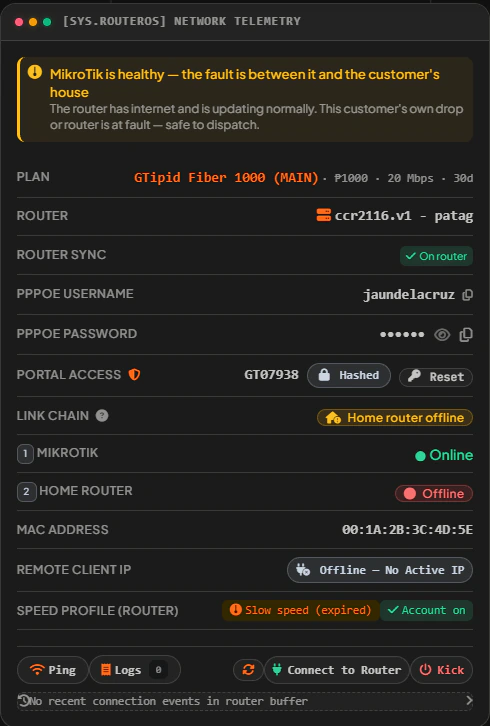
Router or house? Know before you roll a truck
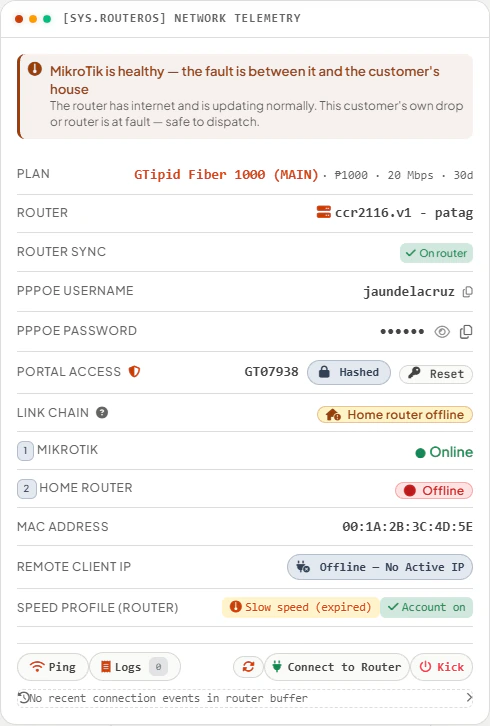
Orbitar checks every MikroTik every minute. When three or more paid lines on one router drop within half an hour, it flags a possible area outage, so your team is rolling before the hotline lights up. On any customer, the Link Chain tells you if the fault is your router or their house.
The real system
Real screens from a live fiber ISP in Cagayan de Oro, with names, phones, map pins and money blurred. Click any screen to see it full size.
Want to click around yourself? Try the live demo
01 / 08
Every plan · more on Field and Network
Every plan shows collections for today, the week and the month. Field adds upstream health; Network adds live bandwidth and PPPoE sessions online, refreshed on your plan's pulse.
Customer app
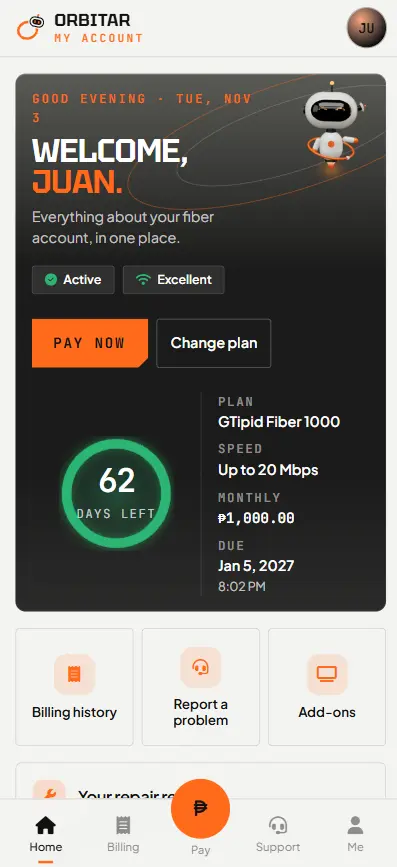
Subscribers check their due date, pay by GCash and get reconnected without calling you.
Every plan
Tech app
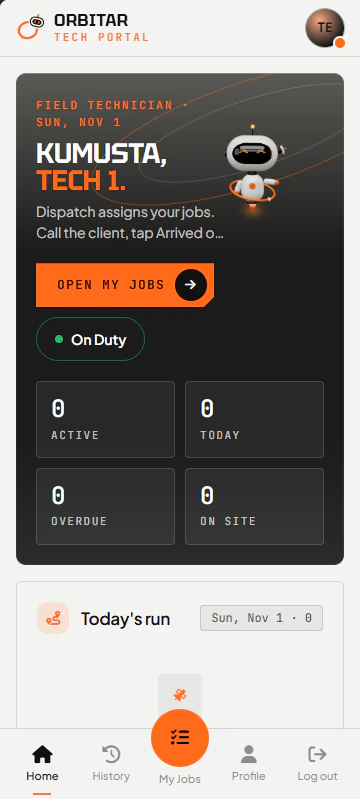
Technicians see today's jobs, go on duty and tap Arrived on site with a GPS stamp.
Field+
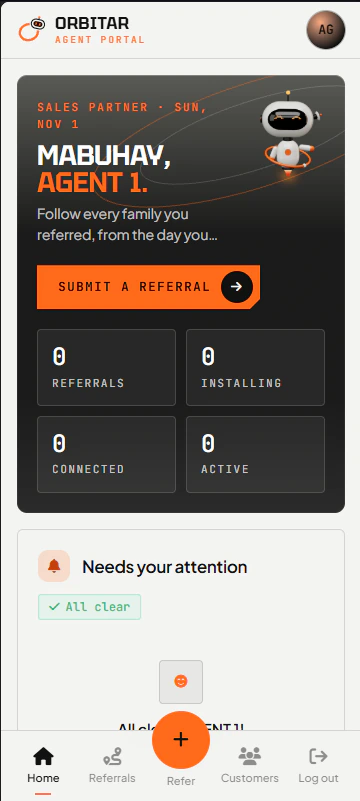
Agent portal
Your sales agents refer a family and follow it all the way to an active line.
Network
Our story
Orbitar started as an OJT project in Cagayan de Oro. Jep Alberto built it inside a working ISP, Gametech Unli Fiber, solving real problems as they came up: missed cut-offs, unpaid accounts slipping through, technicians waiting for their next job, owners guessing at their numbers. What began as a school requirement is now the system Gametech runs its billing on.
To give every ISP in Mindanao, from a one-router barangay network to a multi-branch fiber provider, one dependable system that bills customers, keeps routers in sync and moves technicians, so owners spend less time chasing payments and more time connecting people.
To become the platform ISPs across the Philippines, and beyond, trust to run their business: proudly made in Mindanao, shaped by real ISP work, and better every week.
Every feature came from a real problem at a real ISP.
Each ISP has its own system and database, never mixed with another's. Basic and up get a server of their own.
Payments post only from the POS or a verified online payment. Nothing is guessed.
Staff send Improvement Requests straight to the developer, and updates ship every week.
From the builder
“I started Orbitar to prove that a student from Mindanao can build software real businesses depend on. Every week it gets a little better, and so do I.”
Built withJillian BocLead Frontend & UI Designer
Security & backups
Your billing system holds your subscribers, your payments and your router access. Here is how we protect it, in plain words.
Built with the Data Privacy Act of 2012 (RA 10173) in mind. Read our privacy notice.
Every ISP has its own database. Your customers, payments and router logins never share a database with another ISP. Basic, Field and Network run on a server of their own; Starter, Growth and Plus share a server between small ISPs.
Every plan: your database is copied every night on your server, and Orbitar keeps its own encrypted copy away from it. Need a copy? Ask and we send it. Want the whole server copied every week by DigitalOcean too? Add Weekly server backups.
Every page loads over HTTPS through Cloudflare, which also filters attacks before they reach your server.
Repeated wrong passwords get blocked, sessions end on their own, and each staff role only sees what it needs. Staff can add 2-step sign-in: a 6-digit code from Google or Microsoft Authenticator after the password, and the owner chooses which roles must use it.
An audit log keeps who changed what and when: payments, plans, accounts and settings.
Your server checks in with Orbitar HQ every 5 minutes with its load, memory and disk use, so we can see when it goes quiet or starts filling up.
Your system runs on a separate server, not on our website. Even a late bill never cuts your subscribers' internet: their connections stay exactly as they are.
Leaving? You get a full export of your database. An unpaid server is backed up first, and the backup is kept until 90 days after the missed due date.
Every plan includes
Before you choose
Ask them of every system you look at. Here are Orbitar's answers, all true today.
Yes. Every ISP has its own database and its own address. Basic, Field and Network also run on a server of their own. Leaving? You get a full export of your database.
No. If it stays unpaid, your office system is paused until you pay, but your subscribers' internet is not touched: their connections stay as they are. It is written in our Terms.
You can start with ₱0 setup: we build your system, address and admin account, and you add your plans, routers and customers yourself. Standard setup (₱3,000) and Migration (₱10,000) are optional.
Unlimited, on every plan. Each staff role only sees the pages it needs.
Yes. Starter ₱500 a month for up to 150 subscribers, Growth ₱800 for 300 and Plus ₱1,200 for 500. Each has everything in Basic, on a shared server with your own database and address.
Yes. Staff can add a 6-digit code from Google or Microsoft Authenticator after the password, and the owner chooses which roles must use it.
Connect a router gives you one RouterOS 7 script to paste in WinBox. The router dials a private, encrypted tunnel to your system, so it needs no public IP or open port. Routers stay read-only until you arm them.
Yes. The collector app saves payments on the phone, sends them when signal returns, prints a receipt and texts the customer.
You do. QR Ph payments (GCash, Maya or any bank app) go straight to your own HitPay account. Orbitar never holds them, and the line comes back on by itself.
Yes. Our Terms, Refund policy and Privacy notice are published, and linked at the bottom of every page.
Click through the live demo with sample data, no sign-up. Or run the free leak check on your own customer list and MikroTik lists; it runs in your browser and sends nothing.
Plans & pricing
Basic, Field and Network each run on a server of your own, and every plan includes everything in the plan before it. Small ISP? Starter, Growth and Plus have everything in Basic on a shared server, from ₱500 a month. Unlimited staff on every plan. Prices in PHP.
Shared server
Everything in Basic, for up to 1,000 subscribers. It runs on a shared server with your own database and your own address. Email support. Each plan can add 500 subscribers once and up to 2 extra routers; past that, the next plan up.
More than 5,000 subscribers or 30 routers? Custom plan: message us.
Money leaks
Without automatic cut-off, some subscribers keep browsing after their due date and pay late, or never. Put in your numbers to see what that costs you every month.
300 subscribers × ₱1,000 × 5% =
₱15,000 slips away every month, ₱180,000 a year
Your size fits: Growth, ₱800 a month
Stopping that leak pays for it 18 times over.
All math happens in your browser. Nothing is sent.
Where the money slips away · every plan
Unpaid, but still online
Auto cut-off runs every 15 minutes once the grace days are over, and the line comes back the moment they pay.
Paid, but offline
The "Paid but offline" status box lists them, so your office can fix the line before the angry call.
Duplicate, reused or backdated payments
Payment Alerts flag each one for review before it slips into your books.
Router logins nobody bills
Sync Manager matches router accounts to customers and finds the ones nobody is billing.

Boss, may nakakalusot ba?
Choose your own customer list and your MikroTik's PPPoE lists. It shows who is online without paying, who is paid but offline, and logins nobody bills. It runs in your browser: no file or number is sent to anyone.
Why Orbitar
Orbitar is more than a billing panel. It also runs your collectors, technicians, network watch, agents and your customers' own portal, with your data never mixed with another ISP's.
01Your data is never mixed
Basic, Field and Network each run on a server of their own. Starter, Growth and Plus share a server between small ISPs, and every ISP still has its own database and address, never mixed with another ISP's.
02Payments post themselves
A customer pays by GCash or QR Ph, the payment is recorded and the line comes back on by itself, even at midnight. The money goes straight to your own HitPay.
03Collectors keep working without signal
The collector app saves payments offline, sends them when signal returns, prints a receipt and texts the customer.
04Every job and every peso is checked
Jobs pass a QA call and an admin approval. Cash from collectors and technicians is counted before it counts as collected.
05It tells you where the problem is
Link Chain shows if the fault is your router or the customer's house. Area alerts and Downdetector tell you if it is one line, one area, or Facebook itself.
06It catches the leaks
Payment Alerts flag duplicate, reused and backdated payments. Status boxes show who paid but is offline, and who never paid but is still online.
07Your brand in front of customers
Your own welcome page, online application form and customer portal, in your logo and colours, with seasonal looks.
08Built in the Philippines, with a working ISP
Made in Cagayan de Oro with Gametech Unli Fiber: barangays, GCash, collectors and piso-wifi are built in. Ask for a change from inside the system; updates come every week.
Compare plans
104 features · ● = what sets us apart
| Feature | Small ISPStarter · Growth · Plus | Basic | Field | Network |
|---|---|---|---|---|
| Plan size | ||||
| Subscribers | 150–500 | 1,000 | 2,000 | 5,000 |
| MikroTik routers | 1–2 | 2 | 5 | 10 |
| Staff accounts | Unlimited | Unlimited | Unlimited | Unlimited |
| ●ServerBasic and up: your own server, not shared with any other ISP. Starter, Growth and Plus: a shared server, with your own database and address | Shared | Own · 1 vCPU · 2 GB | Own · 2 vCPU · 4 GB | Own · 2 vCPU · 4 GB |
| Live screens refresh every | 60s | 60s | 15s | 10s |
| Support | Priority, same-day | |||
| Customers & accounts | ||||
| Customer directory with search as you typeFilter by router, barangay, status and connection | ✓ | ✓ | ✓ | ✓ |
| ●Status boxes that show where money is stuckDue soon, Expired, Paid but offline, Never paid but line on | ✓ | ✓ | ✓ | ✓ |
| Up to 3 phone numbers per customerFamilies can share one number across accounts | ✓ | ✓ | ✓ | ✓ |
| Customer profile with full historyStatement of account, payments, modem and MAC history, map pin | ✓ | ✓ | ✓ | ✓ |
| ●Internet, Internet + Vendo and Vendo-only (piso-wifi) accounts | ✓ | ✓ | ✓ | ✓ |
| Account numbers and PPPoE usernames in your own style | ✓ | ✓ | ✓ | ✓ |
| Bulk actionsChange plan, move to another router, SMS or email many customers at once | ✓ | ✓ | ✓ | ✓ |
| Modem stock tracked by serial numberIn stock, assigned, returned or faulty, with handover history | ✓ | ✓ | ✓ | ✓ |
| Internet plans with categories and add-on items | ✓ | ✓ | ✓ | ✓ |
| Export customers and payment logs to CSV | ✓ | ✓ | ✓ | ✓ |
| Billing & collection | ||||
| ●Auto cut-off when unpaid, auto-restore when paidThe router is updated for you; no manual disabling | ✓ | ✓ | ✓ | ✓ |
| POS payments by days or by amount3 days, 15 days, 1 to 12 months, custom days or a custom amount | ✓ | ✓ | ✓ | ✓ |
| ●Promise to PayHold the line until the promised date; one list of active and overdue promises | ✓ | ✓ | ✓ | ✓ |
| Grace days before cut-off | ✓ | ✓ | ✓ | ✓ |
| ●Late-payment rule you chooseStart a fresh month, or count the days already used | ✓ | ✓ | ✓ | ✓ |
| Peso discounts and downtime rebatesEach with a reason on record; rebates can text the customer | ✓ | ✓ | ✓ | ✓ |
| Advance credit, balances and plan upgrade fees | ✓ | ✓ | ✓ | ✓ |
| Billing Statement and Statement of AccountPrintable, and visible to the customer in the portal | ✓ | ✓ | ✓ | ✓ |
| Payment rollback, edit and transferFix a wrong entry without losing the trail | ✓ | ✓ | ✓ | ✓ |
| ●Payment AlertsFlags duplicate, reused-reference and backdated payments for review | ✓ | ✓ | ✓ | ✓ |
| Expenses and money on handCash, bank and GCash balances, expenses by category and the net for each month | ✓ | ✓ | ✓ | ✓ |
| SMS receipt after every payment | ✓ | ✓ | ✓ | ✓ |
| Collection dashboardToday, this month, collection rate and who expires soon | ✓ | ✓ | ✓ | ✓ |
| Online payments & customer portal | ||||
| ●GCash / QR Ph through your own HitPayRecorded and restored automatically, 24/7 | ✓ | ✓ | ✓ | ✓ |
| Money goes straight to your own accountOrbitar never holds your customers' payments | ✓ | ✓ | ✓ | ✓ |
| Customer portalDue date, pay online, payment history and billing statement | ✓ | ✓ | ✓ | ✓ |
| Portal installs on the phone like an app | ✓ | ✓ | ✓ | ✓ |
| Customers report a problem from the portalIt reaches your staff with the account attached | ✓ | ✓ | ✓ | ✓ |
| Customers can upgrade their plan online | ✓ | ✓ | ✓ | ✓ |
| Refer a friend with a cash prizeEach customer shares their own link; you set the prize and hand it over once the friend is installed and pays | ✓ | ✓ | ✓ | ✓ |
| Door-to-door collectorsIncluded in every plan | ||||
| ●Collector app on their own phoneEach collector sees only their barangays | ✓ | ✓ | ✓ | ✓ |
| ●Works offlinePayments are saved on the phone and sent when signal returns | ✓ | ✓ | ✓ | ✓ |
| Thermal-printer receipts and billing statementsPrinted on the spot, with reprint | ✓ | ✓ | ✓ | ✓ |
| SMS receipt to the customer | ✓ | ✓ | ✓ | ✓ |
| Visit notes and "No payment today"The office sees every visit, paid or not | ✓ | ✓ | ✓ | ✓ |
| ●Collector cash remittanceCash-in-hand counter, one-step receiving and a warning when a collector holds too much | ✓ | ✓ | ✓ | ✓ |
| Office summary per collector | ✓ | ✓ | ✓ | ✓ |
| ●Collector ID with a QR code customers can check | ✓ | ✓ | ✓ | ✓ |
| MikroTik automation | ||||
| ●Connect a router with one pastePaste one RouterOS 7 script in WinBox: the router dials a private, encrypted tunnel to your system, so it needs no public IP or open port | ✓ | ✓ | ✓ | ✓ |
| PPPoE accounts created, enabled and disabled for you | ✓ | ✓ | ✓ | ✓ |
| Plan changes apply the new speed right away | ✓ | ✓ | ✓ | ✓ |
| Sync ManagerMatch router accounts to customers, fix dates, and find accounts nobody is billing | ✓ | ✓ | ✓ | ✓ |
| Push speed profiles to routers, or import plans from MikroTik | ✓ | ✓ | ✓ | ✓ |
| ●Router safety locksRouters stay read-only until you arm them, and deletes are blocked unless an admin allows it | ✓ | ✓ | ✓ | ✓ |
| PPPoE login changes reach the router | ✓ | ✓ | ✓ | ✓ |
| ●Link Chain line check per customerIs the problem your router or the customer's house? | ✓ | ✓ | ✓ | ✓ |
| Connection health per subscriber | ✓ | ✓ | ✓ | ✓ |
| NAP boxes and portsEach NAP's OLT and PON port, splitter, barangay, map pin, and which customer is on which port, from the port board, Edit Profile or an Excel import; a port can feed another NAP box (mother and child boxes, up to 4 in a line), shown on the box page, the map and the NOC screen; a port left by a customer who is no longer active can be taken over, with a list of modems to pull out (customers whose promise to pay was not kept come first) and online, offline and pull-out colours | ✓ | ✓ | ✓ | ✓ |
| Splitter loss calculator | ✓ | ✓ | ✓ | ✓ |
| SMS & announcements | ||||
| Your own SMS creditsSemaphore, Twilio or any SMS provider with an HTTP link | ✓ | ✓ | ✓ | ✓ |
| Due-date remindersYou choose how many days before, and what hour | ✓ | ✓ | ✓ | ✓ |
| Bulk SMS and email, with Notice clientsOne announcement, no number texted twice | ✓ | ✓ | ✓ | ✓ |
| ●Outage advisoryText every customer on an affected router or barangay | ✓ | ✓ | ✓ | ✓ |
| Message templates and an SMS log with delivery check | ✓ | ✓ | ✓ | ✓ |
| Push alerts for staff, technicians and customers | ✓ | ✓ | ✓ | ✓ |
| Your public page & sign-upsIncluded in every plan | ||||
| ●Your own welcome pagePlans, promos, why choose us, your people, customer feedback and coverage map | ✓ | ✓ | ✓ | ✓ |
| ●Online application formApplicants pin their house on a map; applications land in one inbox and are tracked until installed | ✓ | ✓ | ✓ | ✓ |
| Homepage settingsEdit every section yourself, no developer needed | ✓ | ✓ | ✓ | ✓ |
| Design settingsYour logo and brand colours, plus seasonal looks such as Christmas | ✓ | ✓ | ✓ | ✓ |
| Marketing roleYour marketing staff can edit the pages and nothing else | ✓ | ✓ | ✓ | ✓ |
| Online application becomes an install job | – | – | ✓ | ✓ |
| Field team | ||||
| Dispatch for installs, repairs, relocations and pull-outs | – | – | ✓ | ✓ |
| ●QA call and admin approval on every jobA job counts only after the customer confirms and an admin approves | – | – | ✓ | ✓ |
| Tech Portal + Android tech appOn the technician's phone: job alerts, Arrived and Done, job history | – | – | ✓ | ✓ |
| NAP box and port on the Done formThe technician taps the port from every port of the box; optional or required, your choice | – | – | ✓ | ✓ |
| Live GPS and proof of visitSee the team on a map; arrival location saved on every job | – | – | ✓ | ✓ |
| Teams, crew helpers and rescheduling | – | – | ✓ | ✓ |
| Bounce-back trackingJobs sent back are counted, with the reason | – | – | ✓ | ✓ |
| ●Technician points, attendance and end-of-day report | – | – | ✓ | ✓ |
| Technician cash remittanceCash collected in the field is checked by finance before it counts | – | – | ✓ | ✓ |
| Portal problem reports become repair tickets | – | – | ✓ | ✓ |
| Network watch | ||||
| Area outage alertsWarns you when several lines drop on one router | ✓ | ✓ | ✓ | ✓ |
| ●DowndetectorIs Facebook, a game or a CDN down, or is it just us? | – | – | ✓ | ✓ |
| Live bandwidth and PPPoE sessions | – | – | – | ✓ |
| ●Customer and NAP mapEvery customer and NAP box on one map, with a line from each NAP to the house: green online, red offline, grey cut off | ✓ | ✓ | ✓ | ✓ |
| NOC screen for a wall TVOnline, offline and cut-off counts, routers, NAP boxes with several lines down at once and the map on one screen that updates by itself | ✓ | ✓ | ✓ | ✓ |
| Fiber signal readingsEach modem's dBm and a Weak signal list, once Orbitar connects your OLT (set up per OLT brand) | ✓ | ✓ | ✓ | ✓ |
| Live MonitoringEvery router and area live, with traffic and graphs | – | – | – | ✓ |
| Live MikroTik logs and Winbox dashboardFix from the office without opening Winbox | – | – | – | ✓ |
| Grow | ||||
| Agents and referralsAgent portal, referrals inbox and their own sign-up link | – | – | – | ✓ |
| ●Automatic commissions and cashoutsAn agent earns only after the customer keeps paying | – | – | – | ✓ |
| Win-backAgents earn points for bringing back cut-off customers, with each client's address and map pin | – | – | – | ✓ |
| Business Report + AnalyticsRevenue by area, month and agent | – | – | – | ✓ |
| Staff & control | ||||
| Ready-made rolesAdmin, Finance, CSR, Dispatch, Technician, Collector and more | ✓ | ✓ | ✓ | ✓ |
| Your own rolesChoose which pages each role opens, or make it view-only | ✓ | ✓ | ✓ | ✓ |
| Temporary cover-duty roles | ✓ | ✓ | ✓ | ✓ |
| ●Need Changes? buttonStaff send a request with screenshots straight to Orbitar and see the reply | ✓ | ✓ | ✓ | ✓ |
| Weekly updates at no extra charge | ✓ | ✓ | ✓ | ✓ |
| Light and dark mode, made for phones too | ✓ | ✓ | ✓ | ✓ |
| Security & backups | ||||
| Your own private databaseBasic and up also get a server of their own; Starter, Growth and Plus share a server | ✓ | ✓ | ✓ | ✓ |
| Nightly database backup | ✓ | ✓ | ✓ | ✓ |
| HTTPS + Cloudflare attack filtering | ✓ | ✓ | ✓ | ✓ |
| Wrong-password lockout & auto sign-out | ✓ | ✓ | ✓ | ✓ |
| 2-step sign-in with an authenticator appGoogle or Microsoft Authenticator; the owner picks which roles must use it | ✓ | ✓ | ✓ | ✓ |
| Audit log: who changed what, and when | ✓ | ✓ | ✓ | ✓ |
| Health check every 5 minutes | ✓ | ✓ | ✓ | ✓ |
| Full database export when you ask | ✓ | ✓ | ✓ | ✓ |
| Subscribers stay online even if your Orbitar bill is late | ✓ | ✓ | ✓ | ✓ |
Every plan includes everything in the plan before it. Online payments and SMS run on your own provider accounts, so that money and those credits never pass through Orbitar.
Add-ons
Add-ons add capacity, weekly server backups, faster support or your own look. They never unlock another plan's system features.
Extra 500 subscribers
Raise your subscriber limit by 500. If you want more speed as you grow, add Bigger server
Extra router
Raise your router limit
Bigger server
A bigger dedicated server; the price is added to your plan each month
Weekly server backups
DigitalOcean copies your whole server once a week and keeps the last four copies; priced by your server size. Without it, your database is still copied every night
Priority support
Your messages are answered first, the same day. Already included in the Network plan
Cignal Play records
If you already resell Cignal Play: track its subscribers, applications and reloads next to internet billing
VMX records
If you already resell VivaOne and VivaMax: track portal requests, reloads and due dates next to internet billing
Own domain
Your own address instead of yourisp.orbitarisp.com. We register a .com for you and renew it every year, or we connect a domain you already own (a .ph from dotPH, for example). You keep the domain
Custom login & portal pages
Staff login, customer login and the customer portal in your brand
Custom system theme
The whole staff system restyled in your brand colours and look
Cignal Play, VMX, VivaOne and VivaMax belong to their owners. Orbitar isn't affiliated with them; these add-ons only keep records for ISPs that already resell them.
Requests
A website designed just for your ISP (every plan already includes a ready-made customer sign-up page), a feature you need, or a change to how something works. Tell us and we'll send a quote.
Before you sign up
Questions
The things ISP owners ask us most. Anything else, message us and a real person answers.
A MikroTik with PPPoE that already works, and RouterOS API access to it. Orbitar links to your routers through that API (on Standard and Migration setups we do the linking for you); it doesn't configure your network, NAT, VLANs or routing.
Yes. Standard setup imports your customers from our Excel template. Migration (₱10,000) adds data cleanup and moving everything from your old system or spreadsheets.
You do. Online payments go through your own HitPay account and SMS through your own Semaphore or Twilio credits. Orbitar never holds your subscribers' money.
No. Every ISP gets its own system and database at your-isp.orbitarisp.com, so your customers, payments and routers never share a database with anyone else. Basic, Field and Network run on a server of their own; Starter, Growth and Plus share a server between small ISPs.
Every plan includes a nightly copy of your database, kept on your server, plus an encrypted copy Orbitar keeps away from it. Ask anytime and we send you a full copy of your database; if you leave, the export is yours to keep. Weekly backups of the whole server by DigitalOcean are an add-on, from ₱300 a month by server size.
You see a reminder inside your system before the due date. After 8 days unpaid, the office system is paused until you pay, but your subscribers' internet keeps running as it is. A server is never deleted without a backup, and that backup is kept until 90 days after the missed due date (75 days after the server is deleted).
Tap Pay on your account page to pay online through HitPay: scan the QR Ph code with GCash, Maya or any bank app. A 1% online fee, or ₱20 if that is higher, is added at checkout. The invoice is marked paid on its own once HitPay confirms it. You can also pay cash on hand, by bank transfer or by GCash and send us the reference, for the plan and for setup or migration, and we mark it paid by hand. Only an online payment starts a new server's build by itself; the others wait until we have checked them.
Yes. Pay 10 months and get 12, so 2 months are free. On Field that's ₱60,000 a year instead of ₱72,000. You can switch between monthly and yearly when your plan renews.
Yes. Use "Request cancellation or data deletion" on your account page. A monthly plan stops at the next renewal; we don't refund a month that has already started. Your backup is kept until 90 days after the unpaid due date (75 days after the server is deleted), then deleted; ask for earlier deletion and we act on it.
Setup is non-refundable once work has started. We don't refund part of a month or a year already used. If you were charged twice, we refund the duplicate less HitPay's fee. The full rules are in our refund policy.
Your system keeps working. It runs on a separate server, not on our website, so billing, the POS, the customer portal and your routers don't depend on our website being up.
Yes, with the Own domain add-on (₱1,500 a year). We register a .com for you and renew it every year. If you already own a domain, or want a .ph (bought from dotPH in your own name), we connect that one instead. The SSL certificate is issued automatically.
On Field and Network, technicians get the Android tech app with job alerts and GPS on arrival. They can also use the Tech Portal in any phone browser.
Standard and Migration setups include online training. Extra help is ₱1,000 an hour, online, and your staff can send improvement requests from inside the system.
Record-keeping for ISPs that already resell those services: subscribers, reloads and due dates next to internet billing. Orbitar isn't affiliated with Cignal or Viva and doesn't sell their services.
Get started
Take this quote to sign-up. You get your own system, linked to the routers you already run, and you keep every customer record on it.
Choose your setup (optional)
Extra help after setup: ₱1,000/hour, online.
We never configure your network: your MikroTik, PPPoE, NAT, VLANs and routing must already work.
Your quote
First payment
Prices in PHP
₱6,000
Questions first? Message us or try the live demo
Two ways to pay
Pay onlineAutomatic
GCash, Maya or any bank app, through QR Ph. Your server starts building by itself the moment the payment is confirmed, even at night. A small online fee is added at checkout.
Cash on hand or bank transferChecked by hand
Also fine, for the plan and for setup or migration. We check it and mark it paid ourselves first, so your server starts building only after that, during office hours.